
Hyperbaric Chamber User Training
Ueerl training helps owners and staff learn the operating routine, controls and daily care of their installed chamber.
Learn on your own equipment: prepare for a session, communicate during use, complete the normal ending sequence and know how to respond when something needs attention. Complete installation handover and training before first use.

Training for your chamber and the people using it
Training should match your model, control-panel version and installed accessories. Tell Ueerl whether you need an initial handover session, help with a specific control or guidance for new staff. The team can confirm the appropriate format and arrangements.
On-site operating guidance
Where included in your installation arrangement, learn with the chamber in its final position. The owner or designated staff can see the controls, practise the operating routine and ask questions during handover.
Remote training support
Ask Ueerl about remote guidance for operating questions or a refresher. Share your equipment details and the topic first, so support can identify the relevant instructions and arrange suitable assistance.
Guidance for new operators
When a new staff member takes over, arrange training on the actual equipment before they operate it. A previous operator’s familiarity does not replace the new person learning the controls and response procedures.
Prepare for your training session
Have your equipment details and operating instructions ready. Include everyone responsible for daily operation, and collect questions before the session. For example, ask the trainer to explain a screen message you do not understand rather than guessing what it means.
Identify your equipment
Find the model name and serial number on the equipment label. Have a photo of the label and control panel ready when requesting a manual or training support.
Confirm installation handover
Check that installation and commissioning have been completed. Commissioning means checking the installed equipment and its operation before it is handed over for use.
Train the people who will operate it
Include the owner or designated staff who will run sessions. Make time for demonstration and supervised practice. Ask the trainer to watch you complete the relevant steps and clarify anything you cannot yet explain.
Use this page to prepare for equipment training, alongside the instructions for your chamber. Questions about personal suitability or clinical use belong with a qualified healthcare professional.
What should I check before each session?
Check the chamber, connections, controls and communication arrangement using the pre-use procedure taught for your model. If a required check fails, do not begin the session; have the issue assessed through the appropriate support channel.
- Chamber condition: inspect the areas specified in the manual for damage, contamination or wear, including the closure and seals.
- Connections and accessories: confirm that the supplied equipment is connected as trained. Do not substitute an unapproved hose, connector or breathing accessory.
- Controls and messages: check the required displays and indicators. Resolve unexplained warnings before use.
- Clothing and personal items: follow the chamber’s permitted-item rules. Do not assume a phone, battery or electronic device is allowed because it works outside the chamber.
- Communication and supervision: confirm how the person inside will contact the operator and follow the supervision arrangement specified for the equipment.
- Operating instructions: confirm the settings and procedure for this session. Do not copy settings from a product video or another user.
Understand the controls before you need them
Ask the trainer to identify each operating control on your chamber and explain when it is used. Panel layouts and available functions vary by model and configuration.
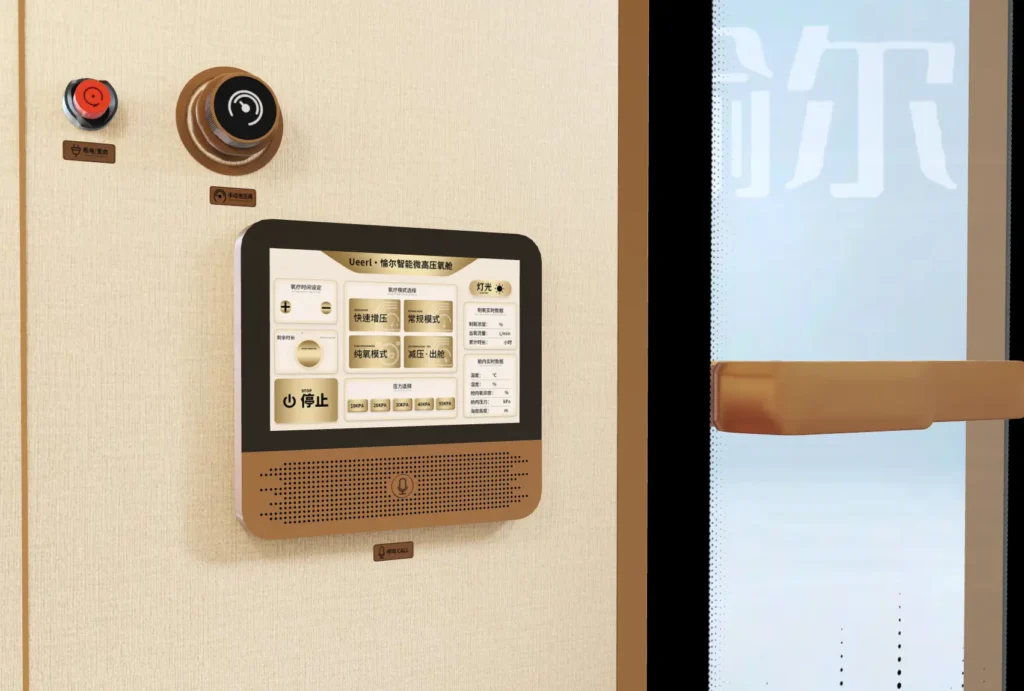
Point out the controls on your actual panel and explain their purpose to the trainer. Learn which functions are available inside and outside the chamber, where fitted.
- Pressure
- The pressure reading describes the pressure inside the chamber. If the screen shows both a current value and a target, ask the trainer to explain the difference and the displayed unit.
- Session timer
- Learn what your timer measures and what happens when it ends. A timer reaching zero does not, by itself, mean the chamber is ready to open.
- Oxygen readings and accessories
- Ask what each oxygen reading measures. An oxygen-source output reading is not automatically the oxygen concentration of all the air inside the chamber. Learn to use the breathing accessories supplied for your configuration.
- Communication
- Learn how to speak with the operator and how to report discomfort. Test the communication method as part of the trained pre-use routine.
- Warnings and emergency controls
- Learn what the relevant warnings mean and the response required by your manual. Emergency-stop, pressure-release and power controls must not be treated as interchangeable.
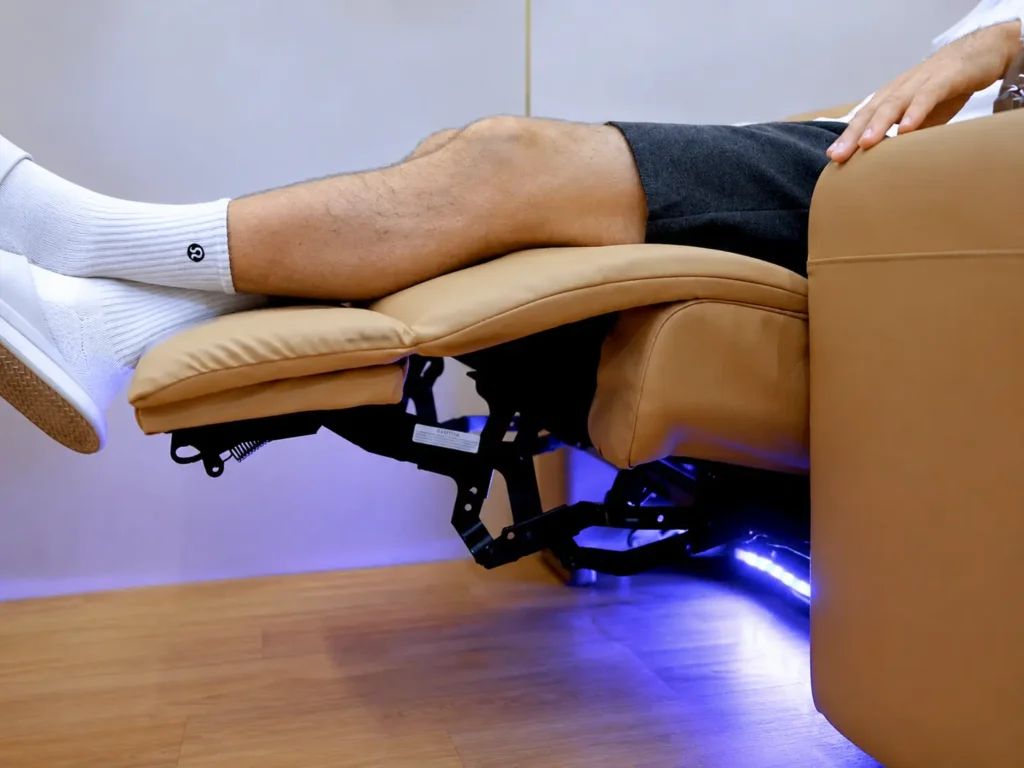
Get comfortable with the seating and supplied accessories
Ask the trainer to show you how to position yourself and use any adjustable seat fitted to your chamber. Practise the adjustment while the chamber is unpressurised, following the model’s instructions.
- Seating: learn the permitted positions and keep hands, clothing and loose objects away from moving seat mechanisms.
- Breathing accessories: identify the supplied mask or other accessory, where applicable. Ask how it is fitted, checked and cared for; do not substitute another accessory without approval.
- Reach and communication: make sure you understand how to contact the operator from your seated position and which controls you are expected to use.
A product photo does not establish which personal items are permitted during use. Follow the rules supplied for your chamber.
Practise a complete session with your trainer
Practise the full routine, including how to end a session. These stages show what training covers; use your model’s operating instructions for the exact controls, settings and conditions for each step.
Prepare the chamber and user
Complete the pre-use checklist, confirm the supervision arrangement and review how to communicate during the session.
Enter and close as instructed
Practise entry and the closure procedure for your chamber. Learn how the operator confirms that it is correctly closed before starting.
Start the trained operating sequence
Use the settings and startup procedure established for your equipment and intended use. Learn which readings the operator must check as pressure increases.
Communicate and monitor
Follow the monitoring procedure throughout the session. Report discomfort promptly; do not continue silently because the timer is still running.
Complete controlled decompression
Decompression means reducing chamber pressure back toward room pressure. Learn the model’s normal ending sequence and how the operator confirms that it has finished.
Confirm safe opening, then finish
Open only when the manual’s pressure and release conditions are met. Never force the closure. Complete exit, shutdown and post-session care as trained.
What if something feels wrong?
Tell the operator immediately and follow the trained response for your chamber. Do not improvise a pressure-release procedure or assume switching off the power will make the chamber safe to open.
Discomfort inside the chamber
Report ear pain or other symptoms promptly. Do not force yourself to tolerate discomfort. Follow the trained procedure; symptoms that persist or are severe need professional medical assessment.
An alarm or unusual equipment behavior
The operator should follow the manual’s instructions for that condition. Record the alarm text or code when safe to do so. Do not bypass a warning or restart repeatedly to make it disappear.
An urgent incident
Use the emergency procedure learned for the installed chamber. For fire, a medical emergency or immediate danger, activate the local emergency response. Email and WhatsApp are not emergency-response services.
Keep the chamber ready for the next user
Follow your manual’s cleaning methods, maintenance intervals and safety checks. Ask which tasks belong to the operator and which require a service technician.
Clean with approved materials
Use only the products and methods specified for your equipment. A household cleaner that seems suitable may damage a seal, window or oxygen-system component.
Follow the maintenance schedule
Use the intervals provided for your model and accessories. Do not apply an assumed filter or seal replacement schedule to every Ueerl chamber.
Keep a useful operating record
Record the date, operator, readings required by your procedure, alarms and actions taken. Accurate alarm text and equipment details help support understand a problem.
Check what you have learned before daily operation
Use these questions to review your training with the trainer. If you cannot demonstrate or explain a required step, ask to practise it again before operating the chamber. This review supports training; it is not an operator certification.
- Can you complete the required pre-use checks and recognise a condition that prevents starting?
- Can you identify the controls and explain the readings used during a session?
- Can you demonstrate the normal startup and ending sequence on your own equipment?
- Can you explain how the person inside communicates and how monitoring is maintained?
- Can you describe the response required for relevant warnings and emergency conditions?
- Can you explain routine cleaning, maintenance responsibilities and how to request support?
Questions owners ask before using the chamber
How do I arrange training after delivery?
Contact Ueerl with your model, serial number, location and preferred language. Explain whether you need initial training, a refresher or guidance for new staff. Ask the team to confirm the format, timing and any applicable charges.
What pressure and session time should I use?
There is no universal setting on this page. Use the permitted operating instructions for your exact model and the appropriate guidance for your intended use. A product’s maximum specification is not an individual session recommendation.
Can I use the chamber alone if it has internal controls?
Internal controls do not establish that unsupervised use is appropriate. Follow your model’s manual and the supervision arrangement covered in training. Ask Ueerl to clarify the requirements for your installed configuration.
When can I open the chamber?
Only when the manual’s safe-opening conditions have been met after the prescribed pressure-reduction procedure. Do not rely only on the timer or force the closure if it does not open as instructed.
Can this page train a new staff member?
It can help them prepare for training. Before operating the chamber, a new staff member should learn and practise the procedure for the actual equipment, including emergency responses, with an appropriate trainer.
I have lost my manual. What should I send to Ueerl?
Send your model name, serial number, a clear equipment-label photo and a control-panel photo. Include your order reference if available, so support can identify the relevant documentation.
Get training support for your Ueerl chamber
Tell Ueerl what you want to learn and who will attend. Include the equipment details below so support can identify your configuration. The team can confirm suitable materials, the training format and scheduling arrangements.
Include these details in your message
- Your model, serial number and order reference if available.
- A photo of the equipment label and control panel.
- The step, screen message or alarm code you want explained.
- Your location, time zone, preferred language and whether training is for an owner or a staff team.
WhatsApp opens a draft for you to review and send. It does not submit a booking automatically.